
A useful place to start
Capture the household thoughts on your mind, then sort them into actions, groceries, and choices to discuss. With FamHead voice mode, review and edit the proposed items before confirming what to save.
While you are clearing the kitchen, you remember the school form, the missing eggs, the parcel that needs returning, and a question about Saturday's plans. None of those thoughts arrived in a useful order. They still need somewhere to go.
A family brain dump is a short chance to capture the household things occupying your attention. You can write them down or say them aloud, then sort them into actions, shopping needs, and questions to discuss.
FamHead's voice mode fits that process: you speak, review the proposed tasks, groceries, and decisions, and confirm what should be added to your household. Start with one small batch so you have time to review it properly.
Capture the thoughts before organizing them
Choose a few quiet minutes and work through what is on your mind. You do not need a polished script. Begin with whatever you keep remembering and use enough detail that you will understand it later.
You might say, “We need to return the parcel before the weekend,” rather than just “the parcel.” If a job already has an agreed owner or a real deadline, include that information.
When two adults are doing the exercise, each should capture their own thoughts. Compare the lists afterward. That gives both people a part in noticing what the household needs.
A paper list works for this first step. If speaking feels easier than typing, open FamHead's voice mode and describe the household items aloud.
Sort what you captured into useful next steps
Review each thought and ask what would move it forward. Is there an action to do, something to buy, or a choice the household needs to make?
Some thoughts need clarification before they belong on a list. “Saturday feels too full” could lead to a decision about which plans to keep. Talk about what is difficult to fit before assigning someone another job.
Here is an example of turning loose thoughts into a usable plan.
| Thought | Where it belongs | A clearer item |
|---|---|---|
| The school form is still on the counter | Task | Sign and return the school form by Thursday |
| We are nearly out of eggs | Groceries | Eggs, 1 carton |
| The parcel needs sending back | Task | Return the parcel by Friday |
| Nobody has agreed on Saturday lunch | Decision | Should we eat at home or take a picnic on Saturday? |
| I am unsure what we can fit in this weekend | Conversation and then a decision | Which weekend plans do we want to keep? |
You may also decide that something can wait or no longer needs doing. Keep the items that describe a real household need rather than turning every passing thought into an obligation.
Use FamHead voice mode for a mixed household list
One useful reason to use voice mode is that a single recording can contain different kinds of household items. You can mention a task, remember groceries, and raise an unresolved choice without typing each one separately.
For example, after agreeing who owns the jobs, you could say:
Sam needs to return the parcel by Friday. Alex needs to sign and return the school form by Thursday. We need one carton of eggs, two cartons of oat milk, and dish soap. We need to decide whether to eat at home or take a picnic on Saturday.
FamHead proposes household items from what you say. During review, look for the two tasks, the three shopping needs, and the lunch decision in this example. Check that the wording and details match your intention before adding anything.
Use the names your household recognizes and say quantities clearly when they matter. If an owner has not been agreed, leave the task open for that conversation rather than treating a suggested assignment as consent.
The app's role here is to help you capture and organize what you said. Your household still chooses what needs doing and who will take responsibility for it.
Review the suggestions before saving
FamHead keeps voice suggestions editable before they are added to your household. Review the titles, item types, owners, quantities, and dates that matter. Edit or remove items that do not reflect what you meant.
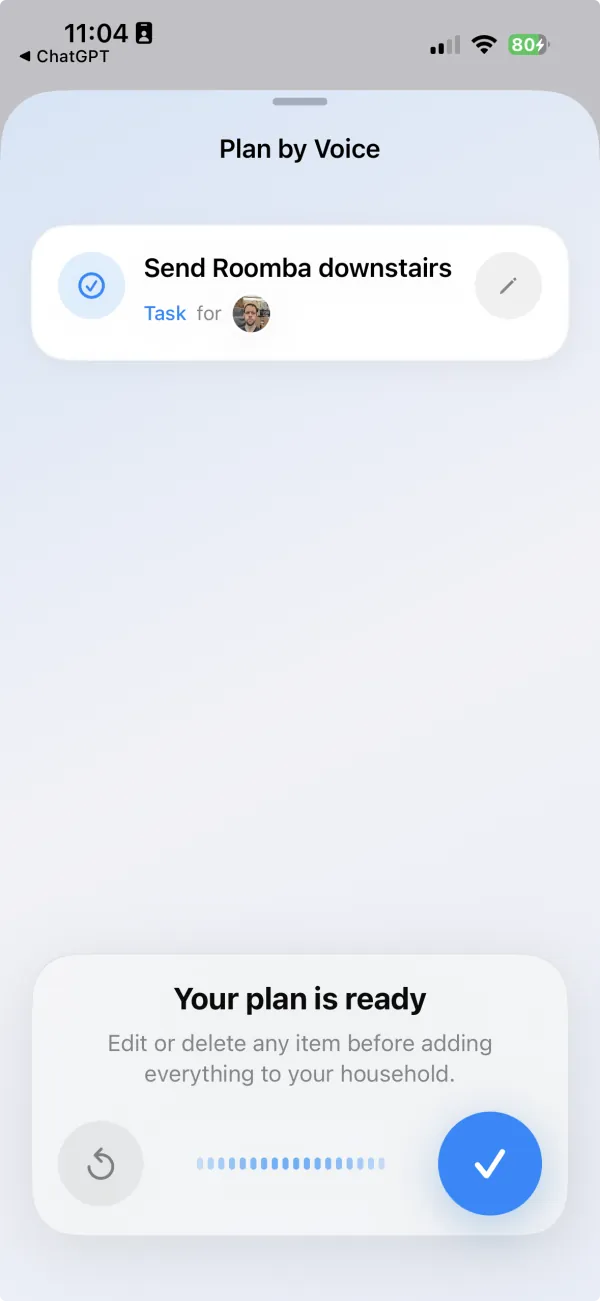
Relative dates deserve a look too. If you said “Friday,” check that the suggested deadline is the Friday you intended. A household member's name or a product quantity is also worth confirming before it becomes part of the shared plan.
Nothing from Live Voice is saved to your household until you review and confirm it. Use that step to remove duplicates and keep unresolved choices as decisions rather than finished answers.
Live Voice processes your recording and relevant household names to produce suggestions. FamHead's privacy policy explains that processing and the providers involved.
Share the responsibility after capturing it
A captured task needs an accepted owner and enough detail to act on. A grocery request needs to reach the shared list the shopper checks. A decision needs input from the people involved.
After saving the reviewed items, compare them with the rest of the household's plan. Check what is already covered, what fits this week, and where you need a handoff. The 20 minute weekly planning routine gives you a place to make those agreements together.
For an open decision, discuss it and record the outcome when you have agreed. Then create any follow-up task. For a grocery need, keep the purchase on the shared shopping list so it can be checked during the shop.
A review checklist for your next voice brain dump
- Each proposed item reflects something I meant to capture.
- Tasks, groceries, and decisions are in the right categories.
- Names, quantities, and dates are correct.
- Duplicate or unnecessary items have been removed.
- Task ownership is agreed or still visibly open.
- Choices that need a conversation remain undecided.
- I have confirmed the items I want to add.
Try it with the next few household things you keep remembering. Download FamHead, say the tasks, shopping needs, and decisions aloud, then review the proposed plan before sharing it with your household. New to FamHead? The 10-minute setup guide gets your household ready first.