Quick answer
FamHead puts a name on every open task and decision, then its Mental Load view shows how many commitments each person holds, the gap between you, and which work has no owner. It's free on iPhone and iPad.
The mental load is the remembering, planning, and checking that keeps a household running: noticing the school form, knowing the milk is low, chasing the plumber. It is hard to share because nobody can see it. FamHead makes it visible: every open task and decision has a name on it, and the Mental Load view shows how many each person is holding.
What the Mental Load view shows
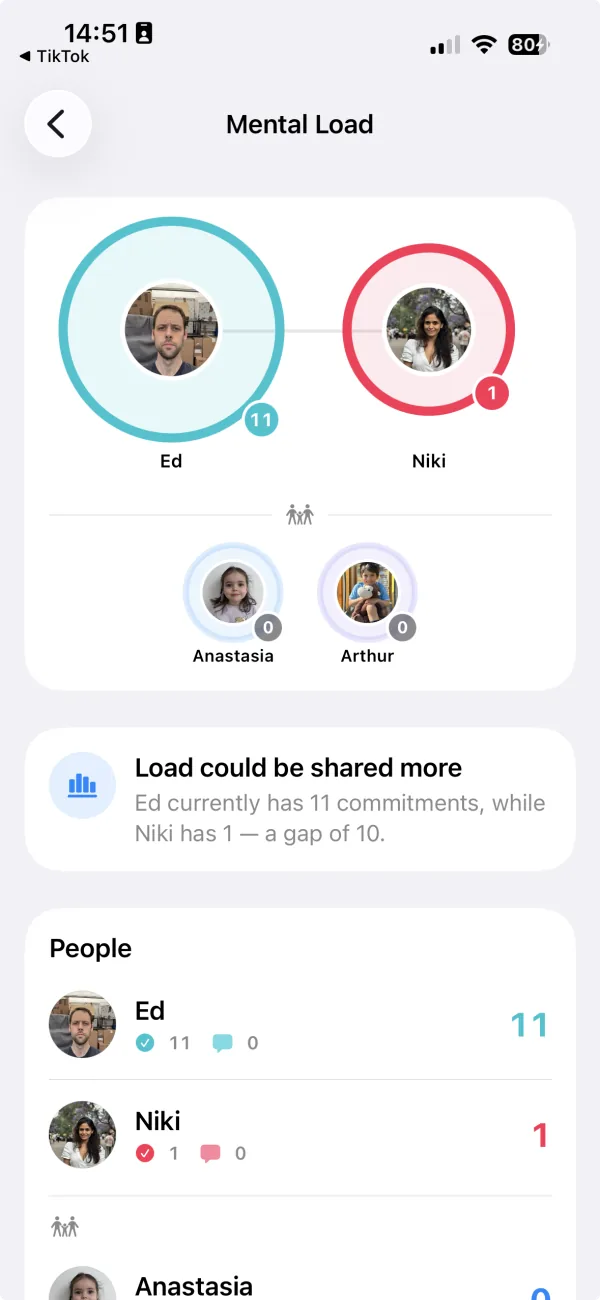
FamHead counts a commitment as an open task assigned to someone, or an open decision they are part of. The Mental Load screen turns those counts into something you can talk about:
- A ring for each adult that grows with their load, split between tasks and decisions.
- A plain-language insight, such as "Load could be shared more", with the actual numbers: who has how many commitments, and the gap between you.
- Work with no owner, shown separately, so the jobs everyone assumes someone else is handling don't hide.
- Children in their own tier, so you can give kids real jobs without mixing them into the adults' balance.
The point isn't a score. It's a fact you can both see before the conversation starts, instead of one person trying to prove how much they carry.
Why the mental load is so hard to share
Sociologist Allison Daminger describes this cognitive work as four steps: anticipating a need, identifying options, deciding, and monitoring the result (American Sociological Review). Most chore charts only cover the doing. The anticipating and monitoring stay with whoever noticed, and that person ends up reminding everyone else.
Sharing the mental load means handing over the whole job, not just the visible step:
| Job | Only the visible part | The whole job |
|---|---|---|
| School forms | Signing the form when asked | Reading school emails, spotting deadlines, getting it signed and returned |
| Groceries | Doing the shop from a list | Checking what's low, planning meals, writing the list, putting things away |
| Birthdays | Wrapping the gift | Remembering the date, choosing a gift, buying it, sending the card |
| Repairs | Letting the plumber in | Noticing the leak, finding a plumber, booking, following up on the bill |
In FamHead, a task has one owner. If it's yours, you own the remembering and the follow-up too.
A 15-minute exercise to rebalance
Not sure where you stand? Take the free mental load test first: 24 quick questions each, then compare your answers.
- Each of you writes down everything you're keeping track of this week, separately. Voice planning helps: say it all in one go, and FamHead suggests tasks, groceries, and decisions to review.
- Add it all to FamHead and give every task an owner. Leave nothing as "we".
- Open the Mental Load view together and look at the gap.
- Move whole jobs, not single steps, until the split feels fair for this week's capacity.
- Look again next week. Fair isn't always 50/50; it should match who has time.
Keep it visible between check-ins
- Mental Load Check-in widget: a one-sentence read on how the load is shared, right on your Home Screen. Pick the tone: Standard, Casual, Blunt, or Unhinged.
- Tasks Assigned widget: shows how many tasks are yours, with a button to add one.
- Assignment alerts: when a task is assigned to you, you get a notification, so handing over a job doesn't need a follow-up text.
Frequently asked questions
What is a mental load app?
A mental load app makes the invisible work of running a household visible, so it can be shared. Usually that means one shared place for tasks, groceries, and decisions, with a name on each. FamHead adds a Mental Load view that counts each person's open commitments and shows the gap between you.
Does FamHead measure how hard each task is?
No. It counts open commitments: tasks assigned to each person and decisions they are part of. A quick errand and a week-long project count as one each, so use the numbers to start the conversation, then talk about effort and time.
Can I use FamHead with my kids?
Yes. You can add children without their own device and assign them tasks. They appear in a separate tier of the Mental Load view, so their chores don't distort the comparison between adults.
Is the Mental Load view free?
Yes. It is part of FamHead's free plan, along with the Mental Load widget. The free plan allows up to 10 active tasks and 5 open decisions per household; Premium removes those limits. See what's included free.
How do I start the conversation about the mental load with my partner?
Start with facts rather than feelings about fairness: each of you lists what you're tracking, then you compare. Our guide on how to share the mental load at home walks through a responsibility audit you can do together.