Quick answer
A chore app for couples works when each person owns whole jobs, not when one partner assigns everything. FamHead gives every chore one owner, repeats it weekly, monthly, or yearly, notifies the new owner, and shows each person's load side by side.
Most chore apps for couples fail the same way: one person writes the list, assigns the jobs, and checks they got done. The chores are shared; the managing isn't. FamHead is built around ownership instead. Each chore has one owner who handles it from noticing to finishing, and the Mental Load view shows when the split drifts.
How FamHead handles shared chores
- One owner per chore. Assign it to the person doing it. Whoever owns it also owns remembering it.
- Repeats. Trash every week, bills every month, the furnace service every year. Set it once.
- A notification on handover. When a chore is assigned to your partner, they're notified, so you don't need to send a follow-up text.
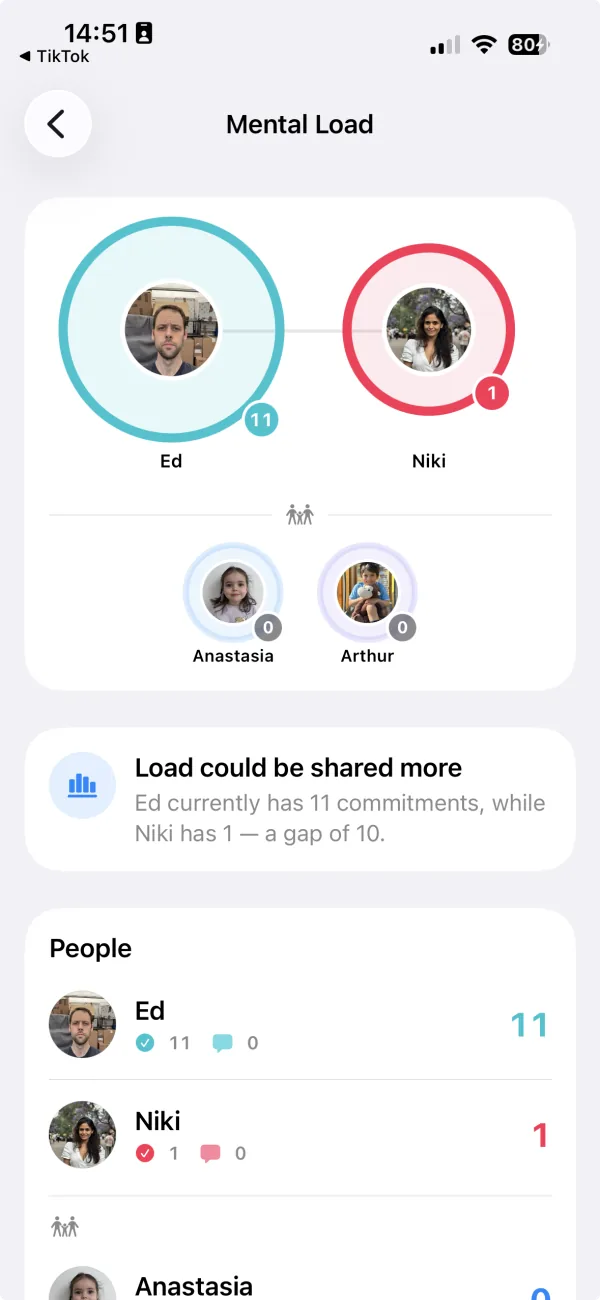
- The Mental Load view. See how many open tasks and decisions each of you holds, with a plain note like "Load could be shared more" when the gap grows.
- Kids included. Add children without a phone and give them chores too. They sit in their own tier, so the adults' balance stays clear.
- Supplies on one list. When the dishwasher tablets run out, they go on the shared grocery list, not in someone's head.
A household chore list to split between you
Use this as a starting point. Go through it together, cross out what doesn't apply, and give each line one owner. The "whole job" column is what owning it means.
| Chore | How often | Owning the whole job means |
|---|---|---|
| Dishes and kitchen reset | Daily | Loading, running, emptying, wiping counters |
| Laundry | Weekly | Noticing the basket, washing, drying, putting away |
| Grocery shopping | Weekly | Checking supplies, writing the list, shopping, unpacking |
| Meal planning | Weekly | Choosing dinners and making sure ingredients are on the list |
| Trash and recycling | Weekly | Knowing collection day, taking bins out and back |
| Bathrooms | Weekly | Cleaning, restocking toilet paper and soap |
| Vacuuming and floors | Weekly | All rooms, including under the furniture |
| Bed linen and towels | Every 1 to 2 weeks | Stripping, washing, remaking |
| Bills and admin | Monthly | Paying, filing, spotting anything unusual |
| School and childcare admin | Ongoing | Reading messages, forms, payments, deadlines |
| Car | Every few months | Fuel, servicing, insurance renewal |
| Home maintenance | Seasonal | Filters, gutters, booking repairs |
| Birthdays and gifts | Ongoing | Remembering, buying, wrapping, cards |
Adding these to FamHead takes a few minutes: create each chore as a task, set the repeat, and assign it. Or say a few at once with voice planning and review the suggestions.
Make the split fair, not just equal
A 50/50 count can still be unfair. One weekly chore can take far longer than another, and a demanding work week changes what's realistic. Agree on three things:
- Capacity: who has more time this month, and what changes when that shifts.
- Standards: what "done" means for the chores you disagree about.
- A check-in: ten minutes each week to look at the Mental Load view and move whole jobs if the gap has grown.
Our guide to dividing chores fairly covers the conversation in more detail. To see where you each stand first, take the free mental load test together, and for a quick team tidy, race our family cleaning timer.
Frequently asked questions
What is the best chore app for couples?
The best chore app for couples is one that makes each person own whole jobs, not one where a single partner assigns everything. Look for one owner per chore, repeating chores, and a way to see the balance. FamHead does all three on iPhone and iPad, and its Mental Load view shows how many open tasks and decisions each of you holds.
Does FamHead rotate chores automatically?
No. Chores stay with the owner you choose. If you want to rotate, reassign the chore at your weekly check-in, or use the drag-to-assign screen to share out a batch of jobs.
Does FamHead have points or rewards for chores?
No. FamHead focuses on ownership and visibility rather than points. For kids, our free printable chore chart and brownie points stickers work well alongside the app.
Can we use FamHead if one of us has an Android phone?
No. FamHead is for iPhone and iPad, and every adult sharing chores needs one. Couples with an Android phone can compare Cupla or other cross-platform apps.
Is it free?
FamHead's free plan includes up to 10 active tasks per household, which covers a starter set of chores. Premium removes the limit. See what's included free.