Quick answer
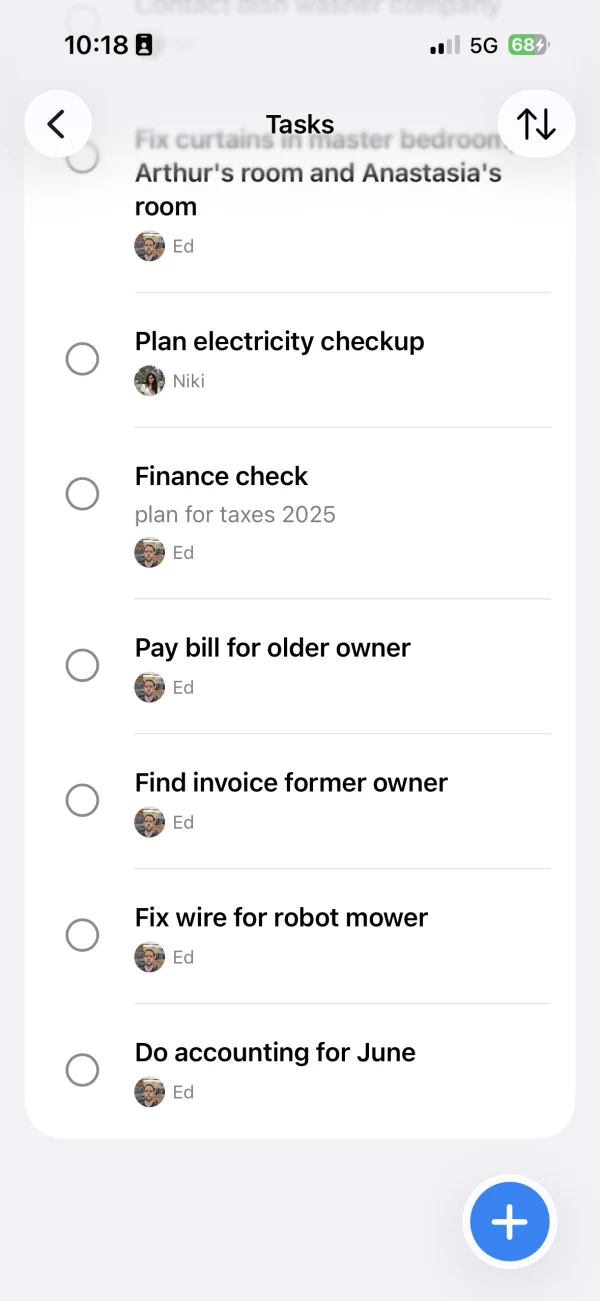
FamHead's shared family to-do list gives every task one owner, with an optional deadline, a weekly, monthly, or yearly repeat, notes, and an urgent flag. Owners are notified when a task is assigned, and children without a phone can be assigned tasks too.
"We need to book the dentist" is how jobs get lost: it belongs to everyone, so it belongs to no one. In FamHead, every task on the family to-do list has one owner, an optional deadline, and a place everyone in the household can see it. When a task is assigned to you, you get a notification. When it's done, everyone sees that too.
What a FamHead task can hold
| Field | What it's for |
|---|---|
| Assign to | One person who owns the task from start to finish, including a child without a phone |
| Deadline | A date it needs doing by, for things like forms and bookings |
| Repeat | Weekly, monthly, or yearly, for recurring chores such as trash day, bills, or the car service |
| Urgent | Pushes the task to the top when it can't wait |
| Notes | The detail the owner needs: a phone number, a size, a login hint |
You can sort the list by urgent first, latest, oldest, or nearest deadline. To share out a batch of work, the Assign tasks screen lets you drag each unassigned task onto a person.
Tasks, groceries, and decisions each have a place
A family to-do list gets messy when everything goes in it. FamHead keeps three kinds of household work apart, so the task list stays a list of things someone can actually finish:
| What you're thinking | Where it goes in FamHead |
|---|---|
| "Someone needs to book the dentist" | A task, assigned to the person who will call |
| "We're out of toothpaste" | The shared shopping list |
| "Which summer camp should we pick?" | A decision, with the people who need to agree |
| "The appointment is Tuesday at 3" | Your calendar. FamHead doesn't sync with Apple or Google Calendar, so keep times there and the jobs around them here. |
Add tasks the fast way
- Voice: say "Max needs to call the plumber and Sam is taking the recycling out", and FamHead suggests both tasks with the right owners. You review them before anything is saved. See voice planning.
- Widgets: the Quick Add widget opens a new task from your Home Screen, and the Tasks Assigned widget shows how many tasks are yours.
- Siri: say "Record a household update in FamHead" to start a voice update hands-free.
Write tasks people can finish
- Start with a verb and an outcome: "Return signed trip form to school" beats "school form".
- Give it one owner. If two people share it, one of them still owns it.
- Add a deadline only when there is one, so real deadlines stand out.
- Put the detail in the notes, so the owner doesn't have to ask.
- Use a repeat for anything recurring, instead of re-adding it every week.
Owning a task means owning the remembering and the follow-up, not waiting to be reminded. That's what moves the mental load as well as the work.
Frequently asked questions
Can I assign tasks to my kids if they don't have a phone?
Yes. Add a child to your household without a device and assign them tasks like any other member. Their tasks show on the family list, and they appear in their own tier of the Mental Load view.
Does FamHead send reminders before a deadline?
Not at the moment. FamHead notifies the owner when a task is assigned to them. To keep deadlines visible, sort the list by nearest deadline or add the Tasks Assigned widget to your Home Screen.
Can a task repeat?
Yes. A task can repeat weekly, monthly, or yearly, which suits chores, bills, and annual jobs like renewing insurance. A repeating task doesn't take a deadline as well.
How many tasks can I have for free?
The free plan includes up to 10 active tasks per household, with completed tasks kept for 30 days. Premium removes both limits. See everything in the free plan.
Does FamHead work on Android or the web?
No. FamHead is for iPhone and iPad. If someone in your household uses Android, compare cross-platform options in our family to-do list app guide.